MCP Tool Design:
make agents call the right tool.
When an agent calls the wrong tool or sends garbage arguments, the usual instinct is to blame the model. Before that, look upstream: the name, description, and inputSchema are the only map the model gets. Here is what the MCP specification actually puts in a tool definition, and how to write each field so the correct call is the obvious one.
September 24, 2026. The Model Context Protocol specification pages linked below were retrieved September 24 and checked for this guide. Documented protocol behavior is kept separate from my recommendations.
The short answer: the definition is the prompt
Tools in MCP are model-controlled. The model discovers them with a tools/list request and decides on its own which one fits the user's prompt. That means the tool definition is not API documentation for humans. It is the entire instruction set the model receives about what your server can do. Every ambiguous phrase in it becomes an ambiguous call at runtime.
The fix is not a longer description. It is a definition where each field does one job: the name routes, the description disambiguates, and the inputSchema makes wrong arguments hard to express. Annotations then tell the truth about risk instead of pretending to enforce it.
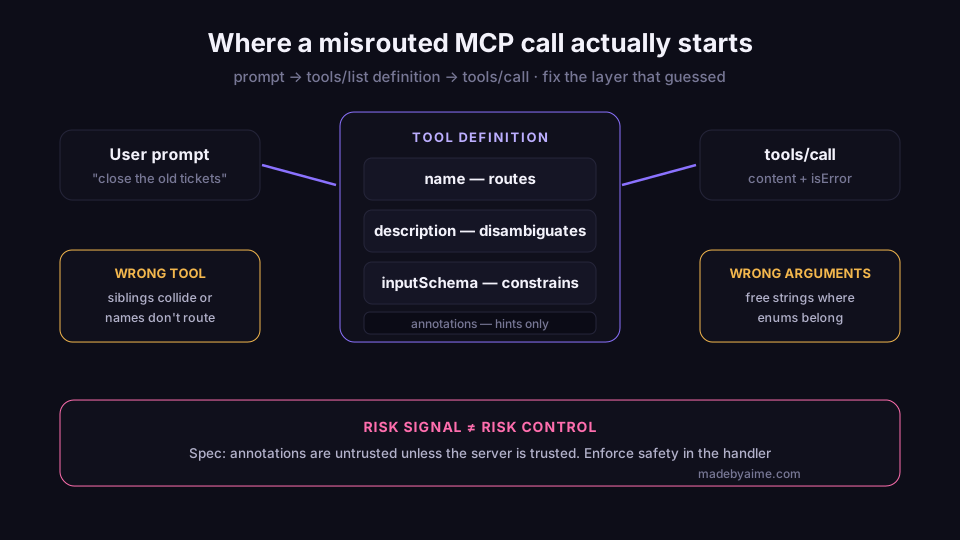
Three layers of routing, one layer of risk signaling. Fix misrouted calls at the layer that caused them.
What the model actually receives
The MCP Tools specification (2025-06-18) defines discovery as a JSON-RPC tools/list request with pagination through cursor and nextCursor. Each returned tool carries a name, a description, and an inputSchema — a JSON Schema object describing the accepted parameters:
{
  "name": "get_weather",
  "title": "Weather Information Provider",
  "description": "Get current weather information for a location",
  "inputSchema": {
    "type": "object",
    "properties": {
      "location": { "type": "string", "description": "City name or zip code" }
    },
    "required": ["location"]
  }
}
Two details from that payload matter more than they look. First, title is a human-readable display name; name is the identifier the model matches on. Writing a lovely title and a cryptic name optimizes the wrong reader. Second, invocation is tools/call, and the result envelope carries both content and an isError flag — the protocol has a first-class way to say "called correctly, failed anyway." Keep that separate from "called wrongly."
Names do the routing
The specification pages are blunt here: tool names should not contain spaces, commas, or other special characters, and should be unique within a server (for example getUser, DATA_EXPORT_v2, admin.tools.list). Uniqueness is scoped to one server, which matters when a client loads several servers into the same agent session — two search tools from different servers are now a coin flip.
My recommendation on top of that: pick one verb-noun convention for the whole server and never break it. If the server has list_invoices and get_invoice, the model can lean on the verb. If it has listInvoices, invoice_get, and fetchInvoiceById, every call becomes a small guess. Consistency is free accuracy.
Descriptions: examples beat adjectives
The description is read by the model at selection time, so it has to answer one question: when should this tool be called instead of its siblings? "Handles customer data" is decoration. "Returns the CRM record for one email address; use search_contacts when you only have a name" is routing.
My recommendation list for descriptions is short: lead with the disambiguation, then spend the budget on one example call — the kind of input that should trigger this tool — instead of three more adjectives. Keep each tool's operation focused and atomic, and validate at the boundary; we get to both below.
Put boundary rules in the description too: what the tool does not do, which sibling handles that, and any hard limit ("max 100 rows per call"). Negative boundaries are what stop the close-but-wrong tool from getting picked.
Schema: make wrong calls unrepresentable
inputSchema is JSON Schema — a media type for describing JSON document structure with validation and annotation vocabularies, per the JSON Schema 2020-12 core specification — and per the MCP specification it defaults to draft 2020-12 when no $schema field is present. That gives you enum, pattern, numeric ranges, and per-property descriptions — and every one of them is a constraint the client can check before your handler ever runs. A status parameter with an enum of four values cannot arrive as free text. That is the goal: push as much error as possible out of runtime and into the schema.
Three schema habits pay off immediately:
- Mark
requiredhonestly. If the handler cannot work without a field, it belongs inrequired. Optional-by-schema and optional-by-implementation are different promises. - Describe every property. The property description is what tells the model what a valid value looks like. "City name or zip code" in the example above is doing real work.
- Close the empty case. For tools with no parameters, the specification recommends
{"type": "object", "additionalProperties": false}, which accepts only an empty object. Bare{"type": "object"}silently accepts anything.
The Tools specification also documents outputSchema for validating structured results, and the 2025-11-25 definition adds an execution object with hints such as taskSupport. Output validation is worth adopting as soon as your client supports it: a result that matches its schema is one less thing the model can misread downstream.
Annotations are hints, not permissions
Tool definitions can carry annotations such as readOnlyHint, destructiveHint, idempotentHint, and openWorldHint, plus a human-facing title. They are useful signal for clients building approval UI. They are not a security boundary, and the specification says so directly: under Tool Safety, "descriptions of tool behavior such as annotations should be considered untrusted, unless obtained from a trusted server," and hosts must obtain explicit user consent before invoking any tool. Tools are arbitrary code execution, treated with appropriate caution.
An annotation can lie. If a deletion must never happen without a human, the guarantee lives in your handler — a confirmation step, a dry-run parameter that defaults to safe, or a two-phase call — not in destructiveHint: false.
The specification's user-interaction guidance points the same direction: there should always be a human in the loop with the ability to deny tool invocations, and applications should present confirmation prompts for operations. When the spec is telling implementors to put humans in the loop, the tool definition's job is to make that decision legible: say plainly what the call will do before the person approves it.
Errors are part of the interface
A tools/call result with isError: true is still a successful round trip. What the error text contains decides whether the agent recovers or thrashes. "Invalid input" invites a retry with the same garbage. "status must be one of open, paid, void" hands the model the fix.
Validation errors should name the field, the constraint, and the allowed shape. That is not politeness — the error text is the only channel that reaches the model after the schema check has already failed somewhere upstream. My recommendation: treat error handling, validation, and progress reporting for long operations as part of the tool's public surface, not as internal hygiene.
Definition review checklist
What better definitions do not fix
Honest caveats, because this is a design guide and not a promise. Model judgment still varies, and a clean definition reduces misrouting rather than eliminating it. Pagination adds one wrinkle — my read, not documented behavior: with many tools behind nextCursor, a busy server can crowd its own best tool out of the first page. And no amount of description wording substitutes for testing — send the awkward prompts at your own server and watch which tool gets called with which arguments.
But the order of operations is right: fix the name convention, then the disambiguation, then the schema constraints, and only then blame the model. The definition is where a guess first enters the system.
Sources and methodology
This is a sourced design guide, not a first-person production test report. Sources were retrieved September 24, 2026. Documented MCP behavior is separated from my recommendations, which are labeled as such.
- JSON Schema 2020-12: A Media Type for Describing JSON Documents — the independent JSON Schema core specification behind inputSchema validation.
- MCP Specification: Tools (2025-06-18) — model-controlled tools, paginated
tools/list, definition fields,tools/callresults withisError, and the human-in-the-loop guidance. - MCP Specification: Tools (2025-11-25) — current tool definition shape including
title,icons, andexecutionhints. - MCP Specification overview (2026-07-28) — the Tool Safety principles: annotations untrusted unless from a trusted server, explicit user consent before any tool invocation.
- MCP Specification: Tools (draft) — tool name rules, JSON Schema usage guidance including the closed no-parameter object, and
outputSchema.
Building MCP servers and want working references?
The MCP Bundle collects inspectable MCP tool code and setup notes. It is optional: this guide's patterns still work with any server you write yourself, and the bundle does not guarantee a specific model will route perfectly.
See the MCP Bundle →