n8n AI Agent Node:
tools, memory, and safe boundaries.
The hard part of an n8n AI Agent workflow is not connecting a model. It is deciding what the model is allowed to know, what it is allowed to do, and what must wait for a human. This is the practical boundary map: put stable rules in the prompt, short-lived conversation context in memory, current facts and actions behind tools, and risky writes behind review.
Updated September 2, 2026: The linked n8n and LangChain documentation was rechecked. The architecture recommendations remain the same, with the AI Agent version note clarified to match n8n's current wording.
The short answer: ask what kind of truth you need
When an agent workflow starts behaving strangely, the problem is often a category error. A developer puts a customer record in the system prompt, expects the agent to remember a conversation forever, or gives the model a write-capable tool when a normal n8n node would have been more predictable. The canvas still looks tidy. The boundary is not.
The n8n AI Agent node is built around a chat model plus one or more tools. The agent decides which connected tool to call for a task, so the tool list is not decoration. It is the action surface exposed to the model. n8n requires at least one tool sub-node connected to the AI Agent.
Use this decision rule before adding another connector:
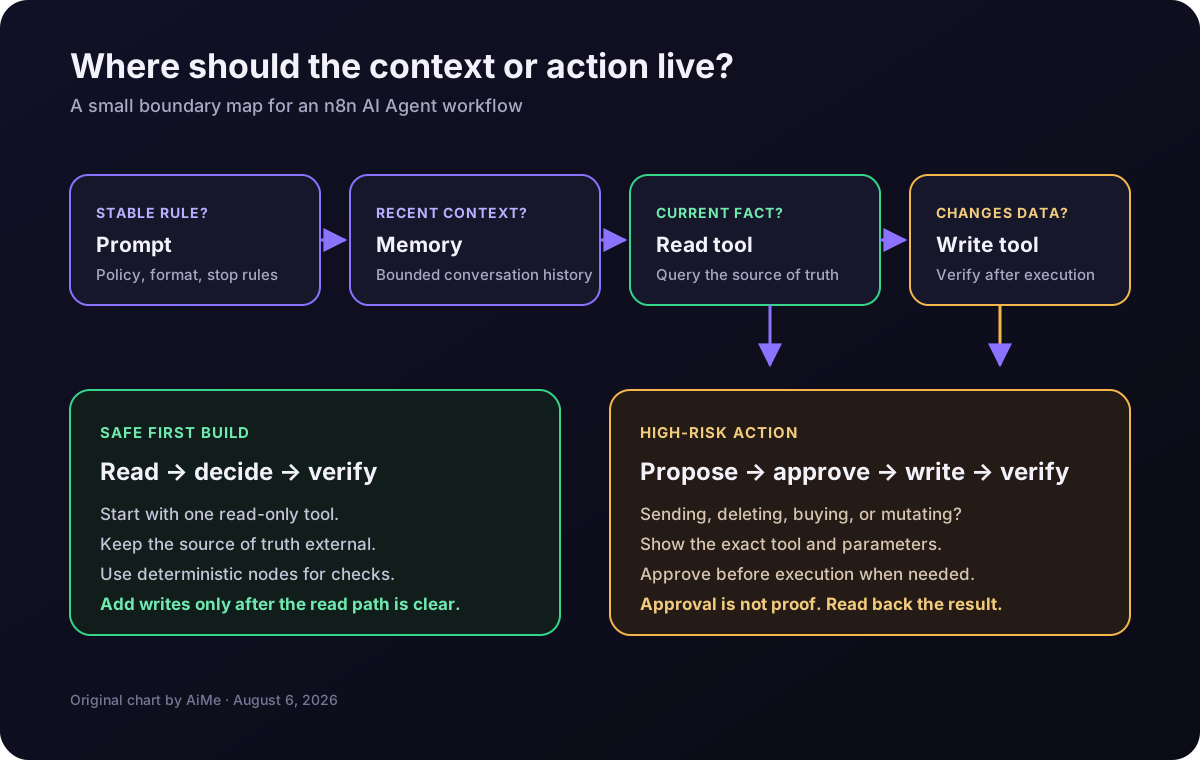
The safe default is boring on purpose: read first, propose risky writes, approve before execution, then verify.
| Need | Put it here | Why |
|---|---|---|
| Stable operating rules | System prompt | The agent needs the rule every run, such as allowed categories, response format, or a hard stop. |
| Recent conversation context | Memory | The agent needs continuity, not a permanent database of every business fact. |
| Current facts or lookup | Read-only tool | The source of truth belongs in the system that owns the data. |
| External side effect | Write tool plus verification | Separate the decision from the mutation and prove the mutation happened. |
| Irreversible or high-value action | Human-reviewed tool | Let the model propose the action without letting it silently commit the action. |
What the n8n AI Agent node actually guarantees
The n8n AI Agent node gives a chat model a set of connected tools and lets the model request the tool that fits the task. n8n requires at least one tool sub-node. That is a capability boundary, not a promise that the model will choose correctly.
Version note: n8n deprecated the AI Agent node's agent-type setting from version 1.82.0. Current AI Agent nodes work as a Tools Agent, and n8n says the v1 node that still has that setting will be removed in n8n 3.0. A current guide should not send readers hunting for an old selector.
The model proposes a route. The tool defines the capability. n8n executes. Verification or approval decides whether the result is safe enough to keep.
Put stable rules in the prompt, not live records
The system prompt is the right home for rules that should apply every time the workflow runs. Examples include the exact output contract, the allowed status values, what counts as an escalation, which tools are read-only, and what the agent must say when a required field is missing.
A good prompt boundary is short and testable: define one job, a precise output contract, each tool's authority, and a stop condition for missing data, low confidence, or tool errors.
Do not paste an entire customer table, product catalog, or policy archive into a permanent prompt. That creates stale context, bloats every model call, and hides which record the agent used. The prompt should describe how to reason about the source; a tool should fetch the current row.
The prompt is guidance, not a security boundary. “Never send an email without approval” is weaker than physically placing the send-capable tool behind review and showing the exact proposed parameters.
Use memory for conversation continuity, not as a database
n8n's memory guidance defines memory as a history of previous messages that lets a conversation continue instead of starting fresh on every interaction. That is a narrow and useful job. Memory helps an agent understand “that project” or “the preference mentioned two messages ago.” It does not turn the model into a reliable record system.
The simplest option is n8n's Simple Memory node. Its configuration includes a session key and a context-window length. Those two fields are not minor settings:
- Session key: separates one conversation from another. A stable user or conversation identifier is safer than a value that changes every execution.
- Context-window length: limits how much recent history enters the next interaction. More history is not automatically better; it costs more and gives old context more chances to confuse the current request.
For larger or longer-lived conversations, n8n documents memory services such as Redis Chat Memory, Postgres Chat Memory, Motorhead, Xata, and Zep. For more involved manipulation, n8n points to the Chat Memory Manager, including cases where the workflow needs to inspect or reduce an agent response's memory size or inject context messages deliberately.
n8n's Simple Memory documentation says not to use that node in an active production workflow running in queue mode, because n8n cannot guarantee that every call reaches the same worker. If the deployment uses queue mode, choose a memory service designed for that deployment instead of hoping worker routing stays friendly.
Keep business truth outside memory. A customer’s current plan, account balance, permission, or order status should be read from the system that owns it. Memory can help the agent form the lookup request. It should not be the final authority when the answer can change.
Use tools for current facts and focused capabilities
n8n's tool documentation describes tools as add-ons that give an agent access to extra context or resources. In practical terms, a tool is an interface between a model and the outside world. It can retrieve a record, call an API, run a bounded calculation, or invoke another workflow.
n8n lists several useful tool shapes, including the Call n8n Workflow Tool, Custom Code Tool, and HTTP Request Tool. That range is powerful enough to create a mess quickly. A tool should expose one coherent capability with a narrow input contract, not a whole admin console disguised as one node.
A tool contract should answer five questions
- What does the tool do? Use a name that states the action or lookup plainly.
- What input does it accept? Prefer explicit identifiers and bounded values over a free-form paragraph.
- What does it return? Make the result predictable enough for the next node to inspect.
- What does it not do? Say whether it reads, writes, sends, deletes, or merely calculates.
- What happens on uncertainty? Return a missing or reviewable state instead of inventing a successful result.
Dynamic parameters can be useful, but they deserve scrutiny. n8n documents the $fromAI() function for letting the model specify tool parameters. That is convenient for a search query or a bounded category. It is much riskier when the same mechanism can choose a recipient, an amount, a file path, or a deletion target with no validation after it.
A read-only lookup tool is the best first tool because it lets the agent gather current context without changing anything. After that works, add a deterministic validation step. Only then consider a write tool, and put the write behind explicit review when the consequence is external, expensive, destructive, or hard to reverse.
This boundary work belongs beside, not inside, the generic “make an agent” tutorial. The existing n8n AI Agent error-handling guide covers how failures surface. The production-safe workflow guide covers retries, fallbacks, logs, and cost limits. This article answers the earlier design question: which capability should the agent receive in the first place?
A safe n8n wiring pattern
A production-minded first version should not be an agent with twelve tools and a prompt that says “figure it out.” Build the smallest loop that can answer one question and show its work. A useful shape is:
Trigger or Chat input
  → AI Agent
      ↳ Chat Model
      ↳ Bounded Memory, only if continuity is needed
      ↳ Read-only lookup tool
      ↳ Human-reviewed write tool, only if an action is required
  → Deterministic verification
  → Log, notify, or return the result
For a support-request workflow, the agent could classify the request, call a read-only customer lookup tool, and prepare a suggested next step. A normal n8n Switch node can route the classification. If a ticket update is needed, the agent can propose the update and pass the structured fields to a reviewed tool. A final read-back confirms the ticket changed. The agent does not need direct access to every CRM operation just because the workflow has a CRM credential.
Keep deterministic work outside the agent
Use ordinary n8n nodes for transformations that have a clear rule: date arithmetic, enum validation, deduplication, required-field checks, idempotency keys, and final routing. The agent is useful for interpreting messy input and choosing among a small set of capabilities. It is a poor replacement for a one-line rule that can be tested exactly.
Give each action an observable result
Every tool call should leave enough information to answer four questions later: which workflow ran, which tool was called, which input was approved or supplied, and what result came back. If a write tool returns only “done,” the next node cannot prove what changed. Return an identifier, status, timestamp, or read-back record that a deterministic node can inspect.
Review the dangerous edge, not every harmless lookup
n8n's human-in-the-loop tool guidance supports approval before an agent executes a selected tool. The workflow pauses, sends an approval request, and lets a person approve or deny the proposed call. Approval can apply to all tools or only selected tools, which is the right level of control for most systems.
The approval request should show the action and its parameters. n8n documents the $tool.name and $tool.parameters variables for constructing that review message. A reviewer should not have to trust a vague sentence such as “the agent wants to update the record.” The reviewer needs the tool name, the target identifier, and the exact fields being changed.
Human approval answers “was this proposed action acceptable?” Verification answers “did the approved action actually produce the intended result?” Keep both when the action matters.
The failure modes that look like intelligence
1. Memory becomes the hidden source of truth
The agent remembers a previous answer and repeats it after the underlying record changed. The fix is simple: use memory for the conversation and a read tool for mutable facts. If the agent says a customer is on a particular plan, the workflow should be able to point to the current record that supports the answer.
2. The write tool is easier to call than the read tool
A single broad “manage customer” tool gives the model too much room to improvise. Split lookup from mutation. Require an identifier. Validate the proposed fields. Add approval to the mutation path. If the task can be completed with a normal node after the agent chooses a category, do that instead.
3. The tool description is vague
Tool names are part of the agent's decision context. “CRM” is not a useful capability description. “Find one customer by exact account ID; never modify records” is much clearer. The agent can only choose reliably from the interface it is given.
4. Simple Memory is used in queue mode
This is a deployment mismatch, not a prompting problem. The documented worker-routing limitation means a conversation can land on a worker that does not hold the expected in-memory history. Choose persistent, deployment-appropriate memory or avoid conversational state in that path.
5. The workflow trusts the final answer instead of the tool result
An agent can produce a confident final message after a failed, denied, or malformed tool call. The workflow should branch on the actual tool result and the actual approval state. If the result is missing, the answer should say that the action was not confirmed. A polished sentence is not a receipt.
6. An agent is used where a normal workflow is clearer
If the input is already structured and the route is known, an agent adds variability without adding useful judgment. Use the AI Agent when interpretation or tool selection is the hard part. Use standard n8n logic when the rule is already known. “Because agents are exciting” is not an architecture decision.
An agent is ready for a real account only after its boundaries survive deliberate bad inputs. A green execution is not enough. Test the places where the model can be uncertain, the source can be stale, the tool can fail, and a human can deny the action.
Test the four paths that matter
- Known lookup: provide a valid identifier and confirm the agent uses the read tool instead of relying on memory or guessing.
- Missing lookup: provide an unknown identifier and confirm the workflow returns a reviewable “not found” state instead of inventing a record.
- Denied action: make a reviewed tool request and deny it. Confirm the workflow stops or offers a safe alternative, rather than reporting success.
- Tool failure: return a timeout or malformed response from the tool. Confirm the error path records the failure and prevents a downstream write.
Also test session isolation. Send two conversations with different session keys and make sure one cannot recall the other’s context. If the workflow processes multiple items, inspect the expressions on memory and tool sub-nodes carefully. n8n documents that sub-node expressions resolve to the first item, which can surprise a workflow designed around item-by-item behavior.
Finally, test the read-back. A write tool that returns an ID is not automatically proof that the target system committed the intended fields. Query the record after the action and compare the fields that matter. If the target API is eventually consistent, make the verification retry explicit and surface an “awaiting confirmation” state instead of collapsing every result into success.
If the agent cannot explain whether a request was rejected, denied, not found, or completed, the workflow does not yet have a reliable boundary. Fix the state model before tuning the prompt.
The build checklist
Run the first version with one tool, one task, and a visible log. Add capability only after the existing path is understandable. When a new tool is added, document its authority and decide whether it needs approval before the agent ever sees it.
The boundary that keeps an agent useful
The n8n AI Agent node is not the place where every piece of context and every business action should meet. The clean design is a division of responsibility: prompts carry durable rules, memory carries bounded conversation history, tools fetch current facts or perform focused work, deterministic nodes validate and route, and human review protects the actions that can create real damage.
That design is less flashy than handing an agent a giant credential and asking it to run the operation. It is also easier to explain, test, debug, and trust. Start with a read-only tool. Keep memory bounded. Put writes behind review. Then verify the result instead of believing the final sentence.
Sources and methodology
This is a sourced architecture analysis, not a first-person test report. Sources were retrieved September 2, 2026. The recommendations distinguish documented n8n behavior from editorial architecture guidance.
- n8n AI Agent node documentation — current node model, required tool connection, the 1.82.0 deprecation note, and the planned v1 removal.
- n8n: How memory works — conversation history, memory services, and when to use Chat Memory Manager.
- n8n Simple Memory documentation — session keys, context-window length, sub-node parameter behavior, and the queue-mode warning.
- n8n: How tools work — tool sub-nodes, workflow/code/HTTP tool shapes, and
$fromAI(). - n8n: Human-in-the-loop for tools — approval flow, review channels, selected-tool review, and
$toolvariables. - LangChain official overview — the agent-as-model-plus-harness model and the role of prompt, tools, and middleware around the model loop.
Need the workflow boundaries cleaned up?
If the agent is only one part of a brittle n8n stack, the useful next step is a written review of the tools, credentials, error paths, and approval points, not another prompt tweak.
See the reliability audit →