n8n Gmail Node:
build inbox automations without the mess.
The Gmail node is not hard because it has too many buttons. It is hard because a small workflow can quietly create duplicate drafts, label the wrong part of a conversation, or turn a helpful classifier into an outbound mail cannon. Here is the bounded pattern: receive a message, inspect it, make one decision, reserve one action, save a draft when needed, persist the handoff, label the source, and stop for a human before anything leaves the account.
September 14, 2026. The n8n, Google, and PostgreSQL documentation linked below was retrieved September 14 and checked for this guide; recommendations are separated from documented behavior.
The short answer: treat Gmail as a state machine
A useful inbox workflow has a visible boundary between reading, deciding, and sending. The n8n Gmail Trigger can find new messages with filters for labels, Gmail search, read status, sender, and whether Spam or Trash should be included. The Gmail app node can then get a message, add or remove a label, and create a draft. Those are separate operations for a reason.
Start with a flow that can end without a reply. If the message is a receipt, newsletter, or internal notification, classify it, record the decision durably, label the original message, and stop. If it needs a response, reserve the action, create an unsent Gmail draft, persist its ID, and only then label the source. Do not attach a send operation simply because the draft step worked.
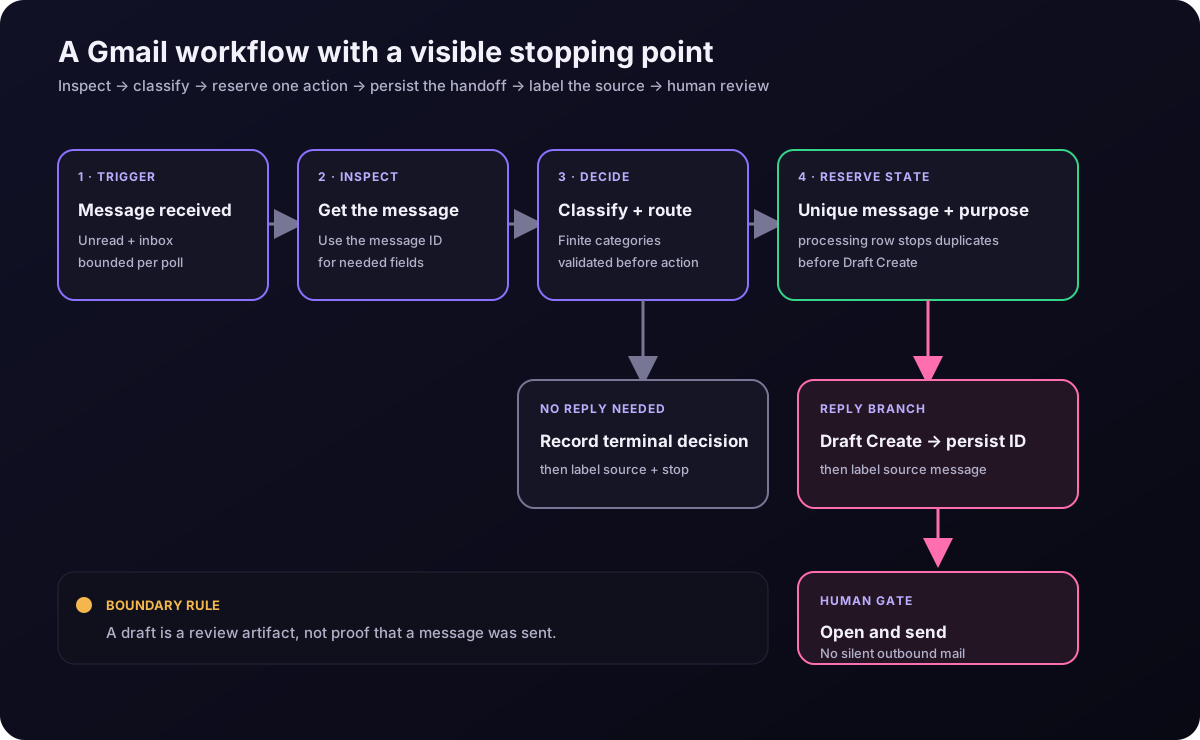
The draft is the handoff. It is not a claim that an email was sent.
What the Gmail Trigger actually gives you
The current n8n Gmail Trigger documentation describes one event: Message Received. It runs at the selected poll time. With Simplify on, the trigger returns message IDs, labels, and headers such as From, To, CC, BCC, and Subject. That is a sensible first payload for routing, but it is not the same thing as having the complete message body available.
Keep the first poll deliberately boring. The documented default for Max Emails per Poll is 10 and the maximum is 50. When more unread messages exist than the limit, the remaining messages are queued for a later poll. That limit is a backlog valve, not a license to process a whole neglected inbox in one run.
| Trigger setting | Conservative starting point | Why it matters |
|---|---|---|
| Read Status | Unread emails only | Prevents every old message from becoming a fresh event while the workflow is being tuned. |
| Search | in:inbox is:unread -label:ai-processed | Uses Gmail's search operators and gives the workflow an explicit processing boundary. |
| Include Spam and Trash | Off unless the use case requires it | Most inbox automations should not promote discarded mail into a work queue. |
| Max Emails per Poll | 10 | A small batch makes duplicates, failures, and manual review visible. |
The Gmail search operator reference documents operators such as from:, subject:, newer_than:, label:, and the minus sign for exclusions. There is an important wrinkle: Google warns that negative operators can still show a conversation when another message in that conversation matches. Treat the query as a filter, not as a perfect idempotency database.
Create the labels before you run it
The labels in the examples are user labels, not magic strings. Create ai-processed, ai-reply-needed, ai-reference, and any ai-error label you intend to use before enabling the workflow. You can create them in Gmail or as a one-time Gmail → Label → Create setup step; do not assume that typing a new name into Add Label creates it. Verify the exact names or IDs before the first production poll.
The workflow: one message in, one controlled decision out
This is the smallest useful version for triage, categorization, and reply drafts. It keeps the model optional: a Switch node can handle known rules, while a tightly constrained classifier can help with messy language. The Gmail operations remain explicit either way.
Configure Gmail Trigger for a narrow inbox slice
Select Message Received, choose a poll schedule, leave Read Status at unread-only while tuning, and start with a maximum of 10 emails per poll. Add a sender, label, or search condition only when it describes the real lane you want to automate. The point is to make the first run small enough that every item can be inspected.
Get the message only when the trigger payload is not enough
Add Gmail → Message → Get and map its Message ID from the trigger, for example {{$json.id}}. n8n's message documentation says the simplified form is equivalent to Gmail API metadata and returns IDs, labels, and headers. Turn Simplify off only when the next step genuinely needs the raw response, then map the smallest body, sender, subject, and thread fields required.
Return a small, boring classification
Keep categories stable: reply, review, reference, and ignore are enough for a first pass. If an AI classifier is involved, require a contract like this and reject anything outside the enum:
{
  "category": "reply",
  "confidence": 0.86,
  "reason": "Customer asks for a status update",
  "needs_reply": true
}
This JSON is an application-level output contract, not a special Gmail setting. Use a Switch or validation step after it. A classifier can interpret; it should not decide that a recipient, attachment, or send action is automatically authorized.
Claim the inbound message before touching the draft
Use a durable Postgres table as the workflow's action ledger. The n8n Postgres node supports Execute Query, and PostgreSQL's INSERT documentation defines ON CONFLICT and RETURNING. Create the table once, with a unique key, then make the reservation the first side-effecting step after classification:
CREATE TABLE gmail_automation_runs (
  idempotency_key text PRIMARY KEY,
  message_id text NOT NULL,
  thread_id text,
  purpose text NOT NULL,
  state text NOT NULL,
  draft_id text,
  category text,
  decision_reason text,
  updated_at timestamptz NOT NULL DEFAULT now()
);

INSERT INTO gmail_automation_runs
  (idempotency_key, message_id, thread_id, purpose, state)
VALUES
  ($1, $2, $3, 'inbox-reply-draft:v1', 'processing')
ON CONFLICT (idempotency_key) DO NOTHING
RETURNING idempotency_key;
Set idempotency_key to the inbound Message ID plus :gmail-inbox-draft:v1. Bind the values through the Postgres node rather than concatenating email text. A returned row is the reservation. If the key already exists, read its record and stop: drafted with a draft_id is a handoff, terminal is a no-reply decision, and processing or error is not permission to create another draft.
Create a draft, then persist its ID
For the reply branch, use Gmail → Draft → Create. n8n exposes fields for Subject, Text or HTML email type, Message, recipients, aliases, Send Replies To, attachments, and Thread ID. Map the original thread ID when the reply belongs in the existing conversation. Keep the To address derived from the message being answered or an approved routing rule, not from a free-form model guess.
Immediately after Draft Create returns, run a Postgres update and require it to affect the reserved row:
UPDATE gmail_automation_runs
SET state = 'drafted', draft_id = $2, updated_at = now()
WHERE idempotency_key = $1 AND state = 'processing'
RETURNING idempotency_key, draft_id;
If Draft Create fails, record error when that is safe to do, but do not add the terminal source label. If Gmail created a draft and the database update then timed out, treat the run as uncertain: inspect Gmail and the ledger, attach the existing draft ID, and only then continue. Never rerun that branch automatically just because the last node returned an error.
For an ambiguous call, stop the worker first. Read the ledger: if already drafted, verify its ID; otherwise mark the unresolved reservation uncertain. After a human verifies the existing Gmail draft belongs to this message and purpose, bind that draft ID as $2 in the second update. These queries never call Draft Create. Require a returned row; otherwise reread and stop rather than overwriting a competing transition.
UPDATE gmail_automation_runs
SET state = 'uncertain', updated_at = now()
WHERE idempotency_key = $1 AND state IN ('processing', 'error')
  AND draft_id IS NULL
RETURNING idempotency_key;

-- Run separately, only after verifying the existing draft.
UPDATE gmail_automation_runs
SET state = 'drafted', draft_id = $2, updated_at = now()
WHERE idempotency_key = $1 AND state = 'uncertain'
  AND draft_id IS NULL AND NULLIF($2, '') IS NOT NULL
RETURNING idempotency_key, draft_id;
The Gmail draft guide makes the boundary explicit: a draft is unsent, it carries the DRAFT system label, and it cannot receive another label. When a draft is sent, Gmail deletes the draft and creates a new message with a new ID and the SENT label. Store the draft ID separately from the inbound Message ID.
Add a label to the source message, not the draft
Only after the handoff is durable, use the Gmail Message operations Add Label action. In the reply branch, that means after the row contains the returned draft_id. In a no-reply branch, first update the row to terminal with the decision, then label the source message. If labeling fails, retry the label operation against the existing ledger row; do not create a second draft.
For no-reply decisions, bind the validated category and concise reason as $2 and $3. Require the returned row before labeling:
UPDATE gmail_automation_runs
SET state = 'terminal', category = $2, decision_reason = $3,
    updated_at = now()
WHERE idempotency_key = $1 AND state = 'processing'
  AND draft_id IS NULL AND NULLIF($2, '') IS NOT NULL
  AND NULLIF($3, '') IS NOT NULL
RETURNING idempotency_key, category, decision_reason;
Choose message or thread deliberately. Google's label documentation explains that a label can be associated with messages and threads, but labels only exist on messages. Adding a label to a thread applies it to all existing messages in that thread; messages added later do not inherit it automatically. If the workflow means “this particular inbound message was processed,” label the message. If it means “this whole conversation is in a review lane,” use the thread-level behavior and verify what is actually covered.
Let automation prepare the draft. Let a person inspect the recipient, subject, body, quoted context, and attachments. Let the person press Send. If a later system owns automatic sending, put that branch behind a separate approval policy and a read-back receipt.
The three places inbox automations get messy
Backlog storms
A poll limit protects the run, but it does not make a backlog harmless. If a failure happens before the final source label, the message can reappear; that is a useful retry signal, not a reason to mark it complete early. Keep the batch small, reserve the Message ID in the ledger, and distinguish processing, drafted, terminal, error, and uncertain states. Add an error label only if you created it during setup.
Thread confusion
A thread is not one immutable email. It is a conversation containing messages, and Gmail's own label behavior distinguishes the existing messages from messages added later. A draft can be attached to a thread by Thread ID, but that does not mean the draft is a labeled inbound message or that it has been sent. Keep messageId, threadId, and draftId as separate fields in your run log.
Duplicate drafts
Here is the concrete duplicate guard: the Postgres row's primary key is the inbound Message ID plus :gmail-inbox-draft:v1. The first execution inserts processing; a concurrent execution loses the ON CONFLICT DO NOTHING race, reads the existing row, and exits. Once Draft Create succeeds, persist its returned draft ID before adding ai-processed. A retry then sees drafted and retries only whatever handoff or label operation is missing.
The external-service failure window still matters. If the draft call may have succeeded but its response or database update was lost, the row is uncertain: stop automatic work, inspect Gmail and the ledger, and reconcile the existing draft. This is why a custom label or a Gmail search query is not an idempotency database. Also remember that replacing a draft replaces its underlying message. The Gmail API documents a stable draft container ID but changing message IDs when the draft is replaced, so track the draft container separately.
A production-minded checklist
Build the boring version first
The n8n Gmail node is capable enough for serious inbox work, but the useful design is not a giant “AI email assistant.” It is a small state machine with readable transitions: the trigger finds a bounded slice, Message Get retrieves only what is needed, a rule or classifier selects a category, the ledger reserves one action, Draft Create prepares a review artifact, the draft or terminal decision is persisted, Add Label records the source state, and a human decides whether anything leaves the account.
That arrangement gives you something better than a clever demo: a workflow that can explain what happened. When the first version is stable, add a new category or a new action one at a time. Keep the send path rare, visible, and separately accountable. Inbox automation should remove admin sludge, not manufacture a new kind of email disaster.
Sources and methodology
This is a sourced implementation guide, not a first-person production test report. Sources were retrieved September 14, 2026. Documented n8n, Gmail, and PostgreSQL behavior is separated from the workflow recommendations.
- n8n Gmail node documentation — the app node's resource and operation surface.
- n8n Gmail Trigger documentation — Message Received, Simplify, poll limits, and trigger filters.
- n8n Gmail Message operations — Get, Get Many, Add Label, and message-level actions.
- n8n Gmail Draft operations — Draft Create fields, Thread ID, recipients, aliases, and attachments.
- Google for Developers: Manage labels — system versus user labels, message/thread behavior, and the rule that drafts cannot receive custom labels.
- Google for Developers: Create and send draft emails — draft containers, changing underlying message IDs, and the transition from DRAFT to SENT.
- Gmail Help: Refine searches in Gmail — supported search operators and the caveat around negative operators and conversations.
- n8n Postgres node documentation — Execute Query and database row operations.
- PostgreSQL: INSERT — unique-conflict handling and RETURNING behavior used in the idempotency example.
Want the reusable workflow patterns?
The n8n Automation Starter Pack lists 14 import-ready workflow files, a setup guide, notes, and instant download for $97 one-time. It is optional: this guide's Gmail pattern still needs your credentials, labels, database, and testing, and the pack does not prove that your exact stack will work without setup.
See the n8n Pack →